As businesses grow, their software requirements evolve. Managing customers, tracking sales, automating daily operations, handling data, and improving team productivity become increasingly important. Choosing the right software can help a business operate efficiently, reduce manual work, and prepare for future expansion.
One of the most common decisions growing businesses face is whether to use off-the-shelf software or invest in custom software development. Both options offer valuable benefits, but the right choice depends on a company's budget, operational needs, growth plans, and long-term objectives.
In this blog, we will explore the differences between off-the-shelf software and custom software, their advantages and disadvantages, and how businesses can choose the right solution for sustainable growth.
What Is Off-the-Shelf Software?
Off-the-shelf software is a ready-made application developed for a broad range of users and businesses. It comes with predefined features and can usually be purchased, subscribed to, and implemented without building the entire system from scratch.
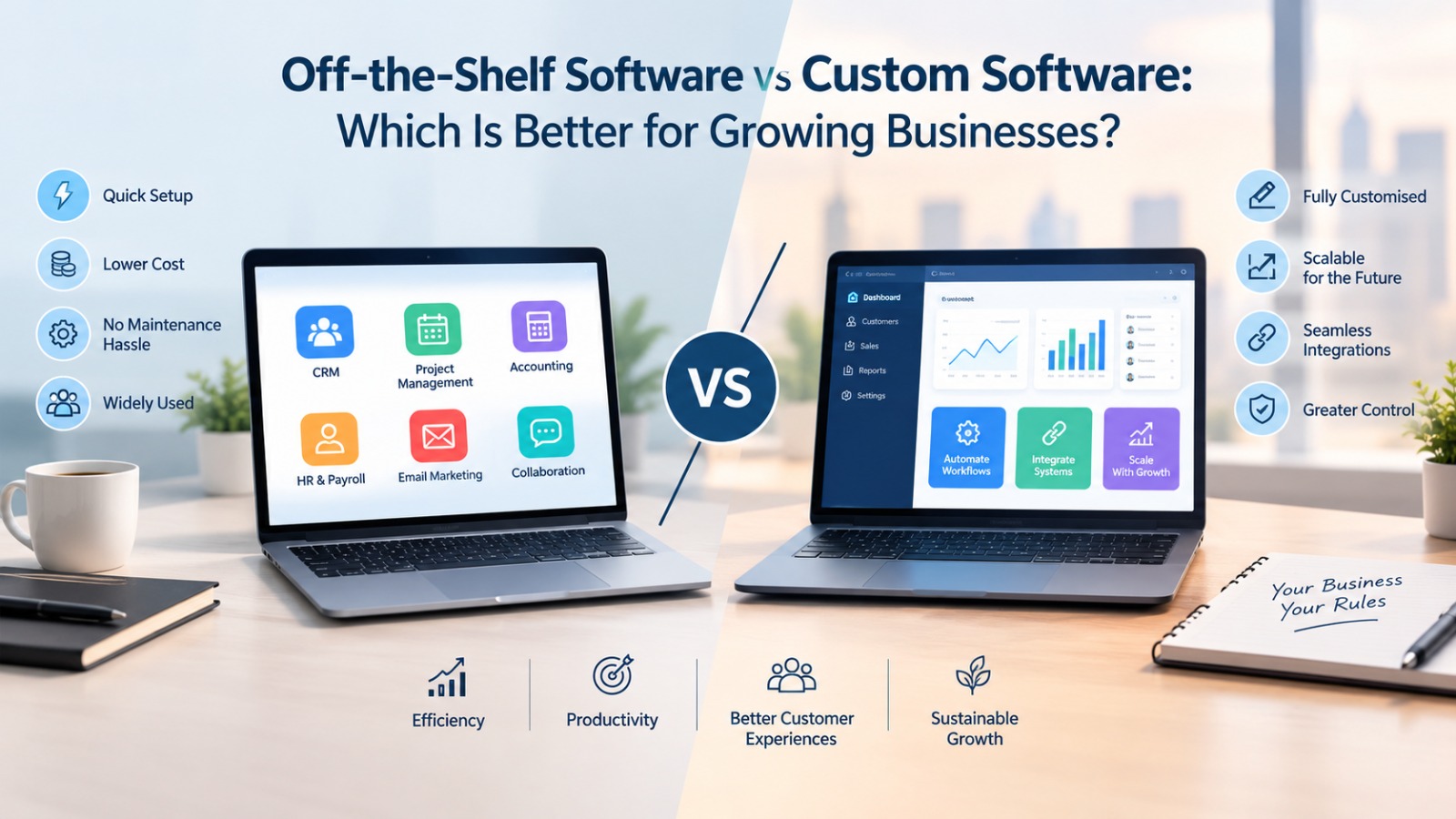
Examples include accounting software, project management tools, customer relationship management (CRM) platforms, payroll systems, and email marketing applications.
Growing businesses often choose off-the-shelf solutions because they can start using them quickly without investing significant time and resources in development.
Advantages of Off-the-Shelf Software
1. Lower Initial Investment
Off-the-shelf software generally requires a smaller upfront investment than custom development. Many products offer monthly or annual subscription plans, making them accessible to startups and small businesses with limited budgets.
2. Faster Implementation
Since the software is already developed, businesses can often begin using it shortly after purchasing a subscription and configuring their accounts. This helps teams introduce new tools without waiting for a lengthy development cycle.
3. Regular Updates and Maintenance
Software providers typically handle bug fixes, security updates, and product improvements. Businesses can benefit from new features without managing the entire technical maintenance process themselves.
4. Established Support and Documentation
Popular software products often provide tutorials, customer support, documentation, and user communities. These resources can make it easier for employees to learn the system and resolve common problems.
Disadvantages of Off-the-Shelf Software
Despite its convenience, ready-made software may not meet every business requirement.
-
Limited customization: Businesses may need to adjust their workflows to match the software's existing features.
-
Recurring subscription costs: Monthly fees can increase as the number of users or required features grows.
-
Integration challenges: Connecting the software with existing systems may require additional tools or paid integrations.
-
Feature limitations: A business may pay for features it does not need while missing capabilities it actually requires.
-
Vendor dependency: Pricing, functionality, and product availability may change according to the provider's decisions.
For businesses with standard operational needs, these limitations may be manageable. However, companies with specialized workflows may eventually require a more flexible solution.
What Is Custom Software?
Custom software is an application designed and developed specifically for a business's unique requirements. Instead of adapting operations to a predefined product, the company works with a development team to build software around its processes, goals, and users.
For example, a growing company might need a customized CRM that connects lead management, automated follow-ups, customer communication, sales reporting, and internal approval workflows in one platform.
Similarly, a logistics company may require software that integrates fleet tracking, route planning, delivery management, and real-time reporting according to its operating model.
Custom software is particularly useful when standard applications cannot efficiently support a company's workflows or long-term growth strategy.
Advantages of Custom Software
1. Designed Around Business Requirements
Custom software can be built to support the exact processes a business needs. This reduces the need for workarounds and helps employees complete tasks through a system that reflects their actual responsibilities.
2. Greater Flexibility and Scalability
As the company grows, the software can be extended with new modules, features, user roles, integrations, and reporting capabilities. This makes it possible to align the technology with changing business requirements.
3. Better Workflow Automation
Custom applications can automate repetitive activities specific to the organization, such as assigning leads, generating invoices, sending follow-up reminders, approving requests, and preparing management reports.
4. Integration With Existing Systems
A custom solution can be designed to connect with existing business tools, databases, websites, and internal applications. The feasibility and cost of these integrations depend on the systems involved.
5. Greater Control Over Features and Development Priorities
Businesses can prioritize the features that create the most value for their operations. They also have more influence over the product roadmap, provided the relevant development resources and contractual arrangements are in place.
Disadvantages of Custom Software
Custom development also comes with responsibilities and risks.
-
Higher initial cost: Planning, designing, developing, and testing software can require a substantial upfront investment.
-
Longer development time: Complex applications may take weeks or months to build, depending on the scope.
-
Ongoing maintenance: The business must arrange bug fixes, updates, security improvements, and technical support.
-
Need for technical expertise: Managing a custom solution may require an in-house team or a reliable software development partner.
-
Project risks: Unclear requirements, scope changes, and poor planning can increase development costs and delay delivery.
Custom software is not automatically better simply because it offers more control. Its value depends on whether the benefits justify the cost and operational responsibility.
Off-the-Shelf Software vs Custom Software: Key Differences
|
Factor |
Off-the-Shelf Software |
Custom Software |
|---|---|---|
|
Development |
Already developed |
Built for specific requirements |
|
Initial cost |
Usually lower |
Usually higher |
|
Implementation |
Generally faster |
Depends on project complexity |
|
Customization |
Limited to available options |
Designed around business needs |
|
Scalability |
Depends on the product and plan |
Can be planned around growth |
|
Maintenance |
Generally managed by the vendor |
Arranged by the business or developer |
|
Integrations |
Depends on available connectors and APIs |
Can be developed for specific systems |
|
Control |
Governed largely by the vendor |
Greater control over the solution |
|
Best suited for |
Standard business processes |
Specialized or complex workflows |
The most important difference is not simply price. It is how well the software supports the business today and how effectively it can adapt as the organization grows.
Which Software Is Better for Growing Businesses?
There is no single answer for every business. The right decision depends on the company's stage of growth, operational complexity, available budget, and competitive priorities.
When Off-the-Shelf Software Is the Better Choice
Ready-made software is often the right option when a business needs to solve a common problem quickly.
Consider it if:
-
Your business is a startup or small company with a limited technology budget.
-
Your requirements involve standard functions such as accounting, email marketing, or project management.
-
You need to implement a solution quickly.
-
Your existing software supports your workflows without significant manual work.
-
You prefer predictable subscription payments over managing a development project.
For example, a small digital marketing agency can use an established CRM, project management platform, and accounting application to organize clients, manage campaigns, and track payments without developing separate systems.
When Custom Software Is the Better Choice
Custom development becomes more attractive when existing software creates operational limitations or fails to support important business processes.
Consider it if:
-
Your business follows specialized workflows that standard tools cannot handle effectively.
-
Multiple systems need to exchange information in a specific way.
-
Manual tasks are increasing as your customer base grows.
-
You require specialized reporting, permissions, or automation.
-
Your software needs are closely connected to your competitive advantage.
For example, a rapidly growing service company may need a platform that connects lead generation, customer onboarding, service scheduling, billing, and performance reporting. If existing tools cannot support this workflow efficiently, a custom solution may help simplify operations.
The Hidden Cost of Choosing the Wrong Software
Software decisions should not be based on the purchase price alone. A solution that appears inexpensive initially may become costly if it creates inefficiencies or requires several additional tools.
Consider the following hidden costs.
Employee productivity: If employees repeatedly transfer data between systems or perform tasks manually, the business loses valuable working time.
Integration expenses: Separate applications may require paid connectors, custom integrations, or additional subscriptions.
Training and adoption: A complicated or poorly matched system can increase training requirements and reduce employee adoption.
Future migration: If a business outgrows its software, moving customer records, financial information, and workflows to another platform can be expensive and time-consuming.
Maintenance and support: Custom solutions require ongoing technical support, while off-the-shelf products may introduce higher subscription tiers or additional service charges.
A useful way to evaluate software is to calculate its total cost of ownership over a three-to-five-year period. Include subscriptions, implementation, integrations, employee training, maintenance, upgrades, and migration expenses where applicable.
Can Growing Businesses Use Both Approaches?
Yes. Businesses do not always need to choose between entirely ready-made and entirely custom software.
A hybrid approach can offer a practical balance between cost, speed, and flexibility.
For example, a business might use:
-
Ready-made accounting software for standard financial processes.
-
An existing CRM for routine customer management.
-
Custom integrations to connect sales, billing, and operations.
-
A custom dashboard to display business-specific performance metrics.
-
Specialized software modules for workflows that existing applications cannot handle.
This approach allows companies to retain reliable tools for common tasks while investing in custom development only where it provides meaningful value.
It can also reduce the risk of building a large application before the business has validated its requirements.
How to Choose the Right Software for Your Business
Before investing in a solution, evaluate your needs systematically.
Step 1: Identify your biggest operational challenges.
Determine which activities consume the most time, create repeated errors, or prevent your team from serving customers efficiently.
Step 2: Define your essential features.
Separate must-have functionality from features that would simply be convenient. This prevents unnecessary spending and keeps the decision focused on business outcomes.
Step 3: Evaluate existing software.
Research available products and test their features, integrations, security controls, pricing, and support. A ready-made solution may already address most of your requirements.
Step 4: Estimate the total cost.
Compare subscription expenses against custom development costs, including implementation, ongoing maintenance, hosting, security, and future upgrades.
Step 5: Consider future growth.
Think about expected increases in customers, employees, transaction volumes, locations, and reporting needs. Choose a solution that can accommodate realistic growth without creating unnecessary complexity.
Step 6: Start with a pilot project.
Test the shortlisted software with a small team or a limited workflow before rolling it out across the organization. Measure whether it improves productivity, accuracy, or customer service.
Step 7: Review the decision regularly.
Business needs change. Reassess your software as the organization expands to determine whether your current solution remains effective or requires additional customization.
Conclusion
Both off-the-shelf software and custom software can help growing businesses improve efficiency, automate processes, and manage expansion. The best option depends on the problems the business needs to solve rather than the technology itself.
Off-the-shelf software is generally suitable for companies that need affordable, readily available tools for standard operations. Custom software is worth considering when specialized workflows, complex integrations, or unique business requirements justify the additional investment.
For many growing businesses, the most practical strategy is to begin with proven software, identify its limitations, and introduce custom development where it delivers measurable benefits.
Ultimately, the right software should simplify operations, support employees, improve customer experiences, and provide a reliable foundation for long-term business growth.